Friday, 19 September 2008

friday sketchers


We've got glorious sunshine in Bristol today, looks like summer has finally appeared!! So why am I sat here playing with winter tildas? Think it might be because Friday Sketchers have a gorgeous sketch this week and I went shopping yesterday!
Tilda is coloured with faber & castell water colour pencils, medium fleshtone, rose carmine (skirt) burnt carmine (coat) and mauve (jeans) paynes grey & van dyck brown. After she was dry I added a light wash of prussian blue to the surround so that her furry collar would stand out. I might add some sparkle to her when it's time to send her on. New DCWV rose tinted xmas stack papers and a very small piece from last years stack. Trimcraft brads and a small section from a papermania xmas greetings stamp.

Cute Card Thursday


Theme this week at Cute Card Thursday is food so I decided to use my very first Tilda. Not sure why the colours are showing the way they are, everything is in a soft peach, rust & cream. Tilda is paper pieced seeing as that's this weeks docraft challenge and I've used a sketch I saw on a blog. Paper is from the Rockstar DCWV stack and the peach card has been embossed with a cuttlebug folder, the ribbon hides the join mark ;o) Flourishes are my own design cut on the cricut.

Thursday, 18 September 2008

Friday sketchers challenge


I've decided that my stash is in the main pretty boring but before I go mad at the shops I ought really to use up some so.. I've decided to try and use freebie papers, something I dont know why I bought and a paper that is in my Too Nice to use box.
For the Friday Sketchers Challenge I used a ballerina stamp from Dimension Fourth which has the skirt 3d. The pink paper is from an old crafts beautiful mag, the nice paper is a double sided pebbles one bought from the Glitterpot and the dont know why I bought (well I do actually... they were in the reduced pile a couple of years ago) are the metal flourishes and flower. I also used a couple of pewter charms I bought from ebay but I gave them a quick squirt with some gold car spray. The small buttons are from Art Of Craft and the white card stock is stamped with a Rubber Tapestry clear flourish stamp using fresco pink & orange chalk pads that I've had for what seems like forever.

Not a tilda in sight


This one is for the cupcake challenge. The corners are from a joy stencil, dry embossed then cut with a scalpel to create photo corners. I used several snowflake stamps & some perfect pearls on the red pearly card and slid into the frame. The greeting is from a Hero Arts clear stamp but havent a clue who makes the snowflakes. I bought it at the Newbury stamp show a few months back so if anyone has a floor plan I might be able to work it out lol.

Wednesday, 17 September 2008

Ribbon Tilda


This was done using a sketch on DutchDare blog. I used scal & the cricut to cut the flower and ribbon border. I'm not happy with it tho, I think I'll change the flower for a green bow at some point.

Tuesday, 16 September 2008

On a roll

Here's another of my playings on inkscape. I drew the heart using the spiro tool and sent it to Paintshop Pro then made lots of duplicates and moved & rotated them into position to create this frame. Once made I sent it back to inkscape then used SCAL to cut it on my cricut. It's layered over an image of Edwin which has been coloured with watercolour pencils as well as paperpieced with black card and some glossy accents applied to the suit collar.
Then mounted on silver mirri and black card. You can see how well the mirri is reflecting the frame. I'm really pleased with this one. just wish the camera would pick up a bit more of the stamping detail.

Monday, 15 September 2008

Another tilda & SCAL card

This is a Tilda from the fall stamp club using the challenge sketch from Cutie Sunday. She's sat on a nested flower I cut on the cricut using SCAL. Once cut it was embossed in the wizard with a texture plate from Fiskars and finally swiped over with a Brilliance gold ink pad. The scalloped squares are also made with SCAL on papermania papers and some rich brown card. These were all mounted on some orangey card which I'd stamped a border using a HOTP bubbles border stamp and some gold perfect pearls. Wish I had used different papers but they looked the right shade of cream & brown under my daylight bulb. Guess that will teach me not to put colours together late at night lol.

More flourish work


I've been playing again. This is Tildas snowman stamped onto a pearly white card and coloured with Faber & Castell watercolour pencils. He's mounted on a DCWV paper and a gold flourish frame made in inkscape & cut with SCAL. I used a flourish stamp & gold perfect pearls on the green background.


Here's another Tilda, this time she's hiding under an oak leaf. The corners and flowers were cut with SCAL. I've also used Swiss dot cuttlebug folder & a few papermania pearls.


Monday, 8 September 2008

Work in progress

Ok I'll admit it I ought to be spending a little bit less time at the PC and doing more in the way of housework but I'm hopelessly addicted to scal and the new inkscape.


Here's a first go at making a flourish frame in inkscape. I used cheap nasty coated card so I could see where I need to touch up the pattern. Think it could do with another small flourish in the bottom corner as well. The rose is from an old stencil, adapted in psp and cut it in several layers. Would look better if I'd used several shades instead of just the one red & green. For a first cut I'm pretty happy with it.


This is a tag advent calender that I adapted from a project I found here
Now I'm too lazy to cut everything by hand so I spent some time making the tag & tag cover in PSP then sent it to scal to cut on card printed using a Joanna Sheen cd. The santa is from a dingbat and adapted in PSP before cutting in scal. Like the frame it needs a bit of tweaking and I think I'll tip each layer with black ink next time. Hopefully I'll be able to upload the scal pattern over the next few days.
The star is a nestie die, and the numbers from Ransom font, both spellbinders. I'll be cutting the next ones on the cricut tho.


Saturday, 6 September 2008

Making & cutting flourishes

I've been having great fun playing with a beta version of inkscape which has the most amazing lil tool called Spiro. Put simply it lets you turn really horrendous wobbly lines into lovely curves. Before I've spent hours trying to make them in paintshop pro, now I can make nice looking flourishes in seconds. Trouble is it's so addictive I dont want to stop making them and have left little time to actually use them on a card. Here's one I did earlier, not my favourite papers but they were the first purple ones to hand.


Papers from papermania pad, tilda coloured with my trusty f&c watercolour pencils. Scallop border made in psp, flourishes in the beta Inkscape then both sent to SCAL and cut on the cricut.

If you want to see the new inkscape make flourishes this is a fab tutorial.

You can find 2 tutorials on downloading & using the beta here.


Thursday, 4 September 2008

yipppeeeeeeeeee day

It's back to school for Tyria today and she's just left, woohoo. That means less tidying to do and more time for playing.
On monday I popped over to my local craft shop and found a new stencil from Joy Crafts.
Couldnt resist playing so out came the wizard to do the embossing ;o)
The first one I just whacked an offcut of some burgundy through, cut the 3 sections & spent yonks doing the embroidery. Trouble was it's such a purpley burgundy I didnt have single paper that worked with it. In the end I went through my drawer of magazine freebies that one day I'll use and found a green rich enough. The smallest of the wizard snowflake die, gold ribbon & some of my favourite 2mm gems finished it off.
For this one all I used was a white pearlescent card with snowflake & swiss dot cuttlebug folders, white ribbon, silver thread and my trusty gems.

This is another Joy Craft stencil but one I bought last year. All I've used is cream linen and pearlescent gold card. 2 of the corners have been embossed using the pattern from the bottom of the bauble. Thread used was a gutterman variagated gold, red & green.

Saturday, 30 August 2008

Corner word card.

As promised here's the step by step on how to make a corner word card in PSP.


Open a new image with a transparent background. I have an expressions so generally use one 12*12 inches.

Go to view and click change grid, change the horizontal & vertical spacing to 1 inch. Go back to view and click to view the grid if it isnt showing.


Chose the font tool and select a nice chunky font without any thin flourishes as these might be too fine to cut well. For this one I used rounded arial and chose 300 as the size.

Create a new layer and type the first letter you want, create a new layer and type the 2nd letter, create a new layer & type the 3rd. Carry on with a new layer for each letter. This is important as you need to be able to move each letter individually. At this stage it doesnt matter whether the letters are clearly spaced, on top of each other or even in the right order.


Select the move tool and move each letter in to place. I use the 1" grid as a guide, making sure that the top & right side are all lined up tidily.


Once you're happy with the placement save the image as a jpg, this is so that you can create an inner layer in scal.
Now chose the draw shape tool from the right hand task bar and draw a rectangle from the top inner right corner down to the bottom left corner. Make sure you overlap a tiny bit of the letters otherwise they wont be attached to the finished card.


Go to layers and merge visible.


Chose the rectangular selection tool and use it to draw a large rectangle over the image making sure it covers all of the image. Click anywhere inside and the lil dashed lines will be all the way around the edges of the image. Chose the paint brush tool and colour it in. For speed I use as large a brush as possible.


Click selections, select none then layers, duplicate layer. Now click image/ mirror.


Your image should look something like the one below.


If you look closely you'll see that the 2 layers are larger than the image, go to image/canvas size and enlarge the canvas width, I changed to 24 * 24. The size doesnt matter as long as it's big enough to fit both layers side by side and a bit of spare space.


Zoom in until you have a really good view of the top of the image. Use the move tool to get both layers joined up. It's important to get them lined up accurately otherwise when you fold the back wont be the same as the front.


Once you're happy, layers/flatten. Zoom out and use the crop tool to get rid of the excess white areas. Save as a jpg and use inkscape to convert to an SVG ready for scal to cut.


Once cut it's just a case of scoring down the middle and decorating.


Promised PSP tut.

This is a different way of making a picture into a 3d cutting pattern. I'm using the same guitar image as before but instead of carefully erasing with the eraser tool we're going to use the magic wand.


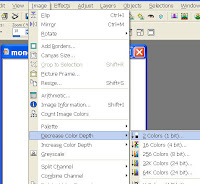
I find it easier to work with the image in black and white. So open your image, go to image/decrease colour and chose the 2 color option.


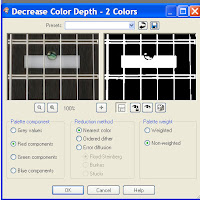
You'll get a box pop up with several options, the settings I use are as the pic but I do sometimes play about to see if an image is improved by using different settings. Click ok when you're happy with the image.


Because the image always opens as a background instead of a layer I always duplicate the layer then delete the background. You wont notice anything different as a rule but it is important.


You now need to chose the magic wand from the side task bar. The magic wand works by chosing linked areas of the same colour.
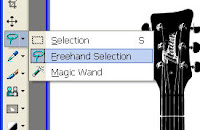


Click anywhere on the white area and it will all be selected. Hit the delete button and it will disappear.


If you look closely at the picture you'll notice that the white area from the guitar has also disappeared. This is because the white frets and the chunk at the bottom had nothing to determine it from the background. This isnt always a bad thing but in this case we need each layer to be clearly marked.


Choose the pen tool from the right task bar and very carefully draw a line along the bottom area and along the edges of the frets. This is going to be your cutting line so it needs to be as accurate as possible.


Once you've drawn the missing lines duplicate the layer a couple of times.

Click the original layer then select the magic wand again and click on the outside of the guitar somewhere on the chequer board. Go to selections and chose invert.


Because we need a solid image we have to colour it in, chose the paintbrush and make sure it's got a large size and colour in. No need to go carefully it wont let you colour outside. If you do find you've coloured over the edges it's because you didnt draw the lines properly. Use the edit undo function and go back and find those missing bits.

Your guitar should look like this now. If you look you will see how large a brush I used and how it didnt go over the edge.
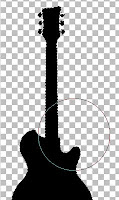


Select your 2nd layer and using the magic wand click on the chequered area by the 7, hold the shift key on your keyboard and select the large area that will also be part of the 2nd layer. Go to selections invert and again hit delete go back to selection and invert again. This is where it looks scarey as the entire 2nd guitar has disappeared and you''' be left with the lil dash lines, dont worry. Go to the paint brush tool again and colour it in.


You will be left with the tiny areas at the base of the strings, go to selection and select none. Using a small sized paint brush carefully colour in.


With most other images we would be using the next of the duplicate layers to work on. However there's no point with this image as the only thing we will be using is the small area where the 7 was. Click on it with the magic wand then go to edit/copy, edit/paste as new layer. If I wanted to add the small rectangular bridge area as I did with the previous cutting pattern it would be easy enough to use the rectangular selection tool and colour in then use the move tool to be able to differentiate it from the layer below.


All you need to do now is move everything into position with the move tool, delete the spare layer and save as a jpg.

Thursday, 28 August 2008

Playing with stencils

I've been playing with stencils this week and while taking breaks from all the cutting I've been blog hopping. On Friday Sketchers I found a sketch that seemed to lend itself to a tag topper. So out came my sadly neglected tag stencils from Marianne, Tildas dog stamp, a sizzlet and a scrap in a stack kit from DCWV which I bought months ago intending to make a scrap book of my lil staffie. The scrapbook hasnt happened so I've made her a birthday card ready for Nov 4th. I wont say what hubby called me when he saw it, but it was full of rude words ;o)


Back to decoupage for this one, again a Marianne stencil but this time I had to make a 15cm gatefold with fold backs. I didnt have any card large enough so I joined 2 pieces of cream linen together. The fairy is a Romak design, paper is from a DCWV stack, some red pearly card some gold peeloff borders and a sore finger from all the cutwork.


Sunday, 24 August 2008

Couple more Tildas

Not so sure about this one, in theory it should work, layout is from a sketch, colours & themes match but something is wrong or missing. Havent a clue what though so I'll probably cannabalise it and start again. Merry Christmas is .75inc Gill sans font cut on the cricut with a 3 & 9 shadow. Nesties & bug folder with my F&C pencils, sakura for a bit of glitter and the asterisk paper is another Pebbles one.


Back to one of my favourite techniques, dry embossing and a blade. Marianne stencil with new Anitas paper & vellum and a couple of magnolia stamps. This time I stamped on pearlescent white card, not so good for the watercolour pencils but gives a lovely glisten in real life.


Thursday, 21 August 2008

Some stamped cards

Stamping isnt my favourite technique, even tho I buy far too many stamps & inks, but after finding Faber & Castell watercolour pencils I think my colouring is improving. They arent exactly cheap but I can really recommend them. www.artifolk.co.uk and Hobbycraft sell them individually for about £1.40 If you're a tilda/sugar nellie/hanglar fan and cant justify a full set at least get the light & medium skin tones and see what you think.


Nesties with papers from Glitterpot. All of the sentiments stamps are from a clear set, either a penny black or hero arts, not sure which but they were bought at Glitterpot.

Sarah Kay stamp from Sirstampalot with DCWV papers. Scalloped card was cut with the cricut & scal.

Again DCWV papers have added a flourish dingbat cut with scal.

Orange paper from DCWV and the green & mauves from a Trimcraft set I regretted buying. Not my favourite card but I was playing with an interactive colour wheel on http://www.colorsontheweb.com/colorwizard.asp#wizard and it suggested purple, orange & green. Most odd as I'd been working with those colours on the last few cards. The bindis are art of craft.